Thursday, May 9, 2013

The search request was unable to connect to the Search Service.

This is an error I faced trying to set up a fast search centre in an OOTB environment.

TechNet provides four common causes for this issue.

1: The communication channels are not cleaned up correctly
2: The FAST Search Server 2010 for SharePoint query processing services are not running
3: The SharePoint certificate is not present on one or more of the FAST Search Server 2010 for SharePoint query processing servers
4: SharePoint has not been configured to point to the FAST Search Server 2010 for SharePoint query processing node

Reference: Technet


Wednesday, May 30, 2012

Getting a site collection backup in SharePoint 2010

Getting a site collection backup in SharePoint 2010 can be done in two methods.
  • Through the Central Admin  
 Go to Central Admin -> Backup and Restore -> Perform a Site Collection Backup -> Give a name and a file location for the backup and click ok.
  • Using PowerShell
Backup -SPSite -Identity <site collection host header> -Path <path of the backup file>

Reference: Technet

Search PDF files via Fast Search for SharePoint 2010

Fast Search for SharePoint 2010 searches PDF files by default(without any 3rd party plug-ins) given that they are not read protected or locked. When creating search scopes for Fast Search, the Document Library which contain the PDF files need to be in the included section of the search scope.

Mentioned below are some of the key points that come up when searching for the PDF search scenarios in Fast Search for SharePoint 2010.


  • List of file types supported by default in OOTB sites – SharePoint 2010 does include PDF by default as search file types
    • http://technet.microsoft.com/nb-no/library/gg471168.aspx
  • Enable advanced filter pack – This is a solution to view content of PDF files in Search of SharePoint 2010
    • http://technet.microsoft.com/nb-no/library/ff383314.aspx
  • Configure iFilter to enable viewing of PDF content in SharePoint search – This is the recommended method to view content of PDF files
    • http://support.microsoft.com/kb/2293357
  • Adding searchable file types in SharePoint 2010 – Additional related info regarding adding searchable file types
    • http://support.microsoft.com/kb/2518465
  • Additional iFilter products
    • http://blogs.msdn.com/b/opal/archive/2009/03/10/pdf-ifilter-battle-second-round.aspx
  •  Select what contents are to be displayed in search results – This can be used to limit access to certain libraries, but it will have to be manually specified with this method
    • http://office.microsoft.com/en-us/sharepoint-server-help/enable-content-to-be-searchable-HA010379092.aspx

Tuesday, April 3, 2012

SP Dispose check

When coding a solution in Visual Studio memory leaks which occurs from object disposals which were not handled can be checked using the tool available here.

Monday, March 19, 2012

Add / remove options from an existing SQL database

When there is a need to change settings of an existing Ms SQL database you will need to add ASP.NET SQL Server Registration into windows registry.
It can be done using the following method.

Navigate to [drive:]\%windir%\Microsoft.NET\Framework\version folder on your Web server, and type aspnet_regsql on the command prompt.

E.g.: 
C:\>cd Windows
C:\Windows>cd Microsoft.NET
C:\Windows\Microsoft.NET>cd Framework
C:\Windows\Microsoft.NET\Framework>cd v2.0.50727
C:\Windows\Microsoft.NET\Framework\v2.0.50727>aspnet_regsql

After registering this functionality existing settings of existing databases can be altered after creation.
More information on the tool can be found on the following reference link.

Reference: http://msdn.microsoft.com/en-us/library/ms229862%28v=vs.80%29.aspx

Sunday, March 18, 2012

How to get the build version of SharePoint 2010

Keeping track on SharePoint 2010 upgrades are critical for maintenance and development using SharePoint.
There are three methods from which the build version of SharePoint 2010 can be checked.

  • From the SharePoint 2010 Central Administration
Go to SharePoint 2010 Central Administration -> Upgrade and Migration -> Check Product and patch Installation Status
  • From PowerShell (registry entry)
 Go to SharePoint 2010 Management Shell and enter the following script to get the SharePoint 2010 version registered in the Windows registry
(Get-item "hklm:software\microsoft\shared tools\web server extensions\14.0").Getvalue("version")
  • From PowerShell (farm build version)
 Go to SharePoint 2010 Management Shell and enter the following script to get the SharePoint 2010 farm build version
(get-spfarm).buildversion

The newest updates on SharePoint 2010 Server can be checked from the following reference location.

References: http://technet.microsoft.com/en-us/sharepoint/ff800847

Tuesday, June 21, 2011

More accurate method to disable Loop back

Method 1 (recommended): Create the Local Security Authority host names that can be referenced in an NTLM authentication request

To do this, follow these steps for all the nodes on the client computer:

1. Click Start, click Run, type regedit, and then click OK.
2. Locate and then click the following registry subkey: HKEY_LOCAL_MACHINE\SYSTEM\CurrentControlSet\Control\Lsa\MSV1_0
3. Right-click MSV1_0, point to New, and then click Multi-String Value.
4. In the Name column, type BackConnectionHostNames, and then press ENTER.
5. Right-click BackConnectionHostNames, and then click Modify.
6. In the Value data box, type the CNAME or the DNS alias, that is used for the local shares on the computer, and then click OK.

Note Type each host name on a separate line.

Note If the BackConnectionHostNames registry entry exists as a REG_DWORD type, you have to delete the BackConnectionHostNames registry entry.
7. Exit Registry Editor, and then restart the computer.

Thursday, April 7, 2011

Steps to deploy a SharePoint 2010 site

The basic steps to deploy a SharePoint 2010 site are as follows;

  • Create Web Application
  • Deploy the content packages 
    •  (using a powershell script)
  • Edit the web.config file 
    • Located in the C:\inetpub\wwwroot\wss\VirtualDirectories\<web_application_folder>
  • Do the IIS-Binding
    • Go to Start -> Run -> IIS-Manager  and select the desired website from the list and click Bindings. Add the url of the site as a new binding. 
  • Enable features
    • This is only required if you are not restoring a backup of a site collection.
  • (Optional) 

Wednesday, April 6, 2011

Restoring a sitecollection backup in SP 2010

In SharePoint 2010 Management Shell you can enter the following command in order to restore a site collection backup in to a SharePoint 2010 we application.

Restore-SPSite -Identity -Path [-DatabaseServer ] [-DatabaseName ] [-HostHeader ] [-Force] [-GradualDelete] [-Verbose]


For example in order to restore a site collection to a certain web application we can use the following command.

PS C:\> Restore-SPSite -Identity http://cd-sgunasena -Path C:\UpdateFw\sitecollectionbackup\abc.bak -HostHeaderWebApplication http://abcdemo.abcompany.com -Force


Reference: MSDN

Monday, April 4, 2011

Using Host Headers

We can use host headers to host different sites in the same port. We can access them using different host names assigned to the same port address in the host file of the machine.
You can find the host file in the following location;
C:\Windows\System32\drivers\etc 
Open it using a notepad and add the host address and the desired host name you wish to use.

E.G.:   
# localhost name resolution is handled within DNS itself.
#    127.0.0.1       localhost
#    ::1             localhost

172.11.111.111    somesite.abcompany.com

Before deploying SP 2010 sites in powershell

I recently joined a release engineering management group for our SharePoint developments in the work place. And I'm now learning deployment related stuff.

Some quick facts:
  • Be sure to be logged in as a farm administrator (I get this confused sometimes as we meddle with a lot of test accounts in order to test SharePoint developments)
  • Make sure the DisableLoopback feature is enabled. You can do this by going to  Registry editor by typing regedit in start menu -> run. In registry goto HKEY_LOCAL_MACHINE -> SYSTEM -> CurrentControlSet -> Control ->Lsa . Right Click on Lsa and select AddNewDWord (32bit) Value and enter "DisableLoopbackCheck" as the name and enter 1 when prompted to enter a value. 
Keep in mind to make sure the following services are enabled and started before running windows powershell to deploy SharePoint 2010 sites.
  • SharePoint 2010 Administration
  • SharePoint 2010 Timer
  • World Wide Web Publishing service

Thursday, January 27, 2011

Errors while running Pre-Upgrade Checker

Last week I was doing another test migration using the database - attach method. This time we were trying to simulate a multi-server farm environment.
Before upgrading, as usual :) , I ran the pre-upgrade checker on the SharePoint 2007 test farm we had created. But it returned several unfamiliar errors!


We found out by checking many things regarding permissions the following two were the reasons for causing erroneous reports.
  • Additional inactive server in the farm
  • insufficient permissions to continue
 This was later resolved by,
  • removing the additional inactive server from farm
  • re-running the pre-upgrade checker using a more privileged account
These errors occur due to misplacement of simple issues. But these things happen when we are thinking only about the big things and not concentrating on small details. Hope this will help a wanderer :)

Thursday, December 16, 2010

Backing up a SP2007 site

A quick guide to creating a backup of a site collection in SharePoint 2007.

Start the command prompt change directory into the 12-hive. A quick tip: 12 hive = "C:\Program Files\Common Files\Microsoft Shared\Web Server Extensions\12\bin"

Type the following command correctly.
stsadm.exe -o backup -url <site collection> -filename <backup file> -overwrite

E.g.: 

stsadm.exe -o backup -url http://ctv-ecmtest1:1515 -filename backup1515.dat -overwrite

There you have your backup!

Friday, December 3, 2010

Attaching DB error while performing Attach-DB Upgrade from SP 2007 to 2010

While performing the database-attach upgrading method I came across many errors yesterday. Some were silly errors like typing errors ;) . But there were some serious errors too like the one I describes in my previous post yesterday.
The last error I logged in to my previous blog post was an error in SQL authentication while trying to run the DB attach command in powershell.
The command was like this,

PS C:\Users\sgunasena> Mount-SPContentDatabase -Name WSS_Content_4455 -DatabaseServer local -WebApplication http://cd-sgunasena:7788


And I tried several ways changing commands and changing databases. But it did not work out. It seems like I was having an issue with SQL authentication. Since this is a work environment I'm not provided with unlimited access to machines, yet I am in the machine admin group. And also in SQL server settings I have given the user all the rights necessary. I'm still looking into the authentication issue.
So the Powershell command didNOT work out for me.
So I consulted a friend of mine and discussed about this. Friend came up with a different command using the command prompt or the old fashioned way!
And of course it worked out fine.
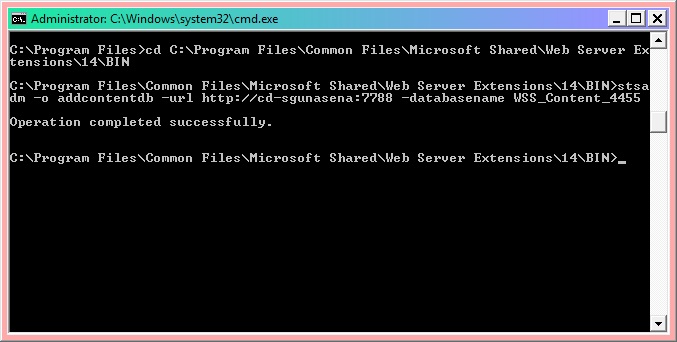
You have to first move into the 14hive in order to perform it using the following command.

C:\Program Files>cd C:\Program Files\Common Files\Microsoft Shared\Web Server Ex
tensions\14\BIN


And then you need to execute the following command in order to get it done the correct way.

C:\Program Files\Common Files\Microsoft Shared\Web Server Extensions\14\BIN>stsa
dm -o addcontentdb -url http://cd-sgunasena:7788 -databasename WSS_Content_4455


Thursday, December 2, 2010

Errors occured while performing Database-Attach Migration

While doing a testing database-attach upgrade from SharePoint 2007 to 2010 I came across some errors.
I was following the steps in Microsoft Technet website and when I was going through database reattaching process I came across several errors and one was like this.


 I found out that I had mixed up the names of the servers I was using. But then there was an error regarding accessing to database.


When I went through some articles in the internet I found out that it was due to the current user not being added to the SPShellAdmin group. This issue can be resolved using this method.

Then again (!) there was another error regarding version incompatibility.


I'm trying get an hotfix for this and rehearse the procedure again.
Today there was a request for a presentation for our head to show to the management, so I had to attend to it with our team :) I will be posting about the updates on these issues!

Monday, November 29, 2010

Setup errors encountered while Installing SP 2007 in a VM

 When I was trying to install SharePoint 2007 in a Virtual Machine for testing purposes I encountered several problems. Thought of documenting it down to help the wanderer!
 The setup I was using was a Windows 7 64bit machine with 6GB RAM and the virtual machine was Sun Virtual-box. I had setup Windows Server 2003 x64 and SQL Server 2005 was also installed.
 When I tried to run the SP2007 setup the setup gave me the following errors.
  • IIS 6.0 not installed
This can easily be solved  by going to add/remove windows components in the control panel.
  • Windows Workflow foundation not installed
 This was an error which occurs due to .NET framework 3.0 not being installed. You can find the .NET 3.0 here.
  • ASP.net feature missing
This is the tricky error! In order to resolve this you need to first install .NET 2.0 framework and configure these steps.

Thursday, November 25, 2010

Getting to know the DB of SharePoint 2007

When I was searching on SharePoint 2007 database analyzers initially I got so many other products including links to main SharePoint Migration Tools available. Those tools do provide analyzing to a certain extent but it can be costly due to licensing issues.
So my friend suggested to refine my search! I did! And the results were marvelous :)
The results I got were a basic tool Microsoft provides free of charge which, amazingly, gives a whole load of information on the DB.

The tool, which is SPDiag v1.0, is included in the Microsoft SharePoint Administration Toolkit v3.0, available for download at the following locations:
Documentation for SPDiag is available from those download pages as well.

Tuesday, November 23, 2010

SharePoint 2007 complete feature list

 When we are researching about SharePoint 2007 to 2010 migration we come across features that are different from each versions, features that does not get upgraded, etc.
 In order to do an effective and complete migration first we need to understand complete feature list of both 2007 and 2010 versions of SharePoint.
 When we were researching my friend "Hasi" found a list of features in SharePoint 2007. This is actually a draft Hasi prepared to discuss with us. I'm posting it as a draft and I will be updating this list as necessary. (And oh forgot to mention that I did ask for permission to post this! Thanks Hasi)


SharePoint 2007 Features
Central Administration
1.       Servers in Farm
2.       Services on Server
3.       Timer Jobs
4.       Incoming/Outgoing E-mail Settings
5.       Web Applications
6.       Solutions

Site Collection /Site
7.       Site Collections                  
8.       Sites
               
·         Collaboration Sites (Team ,Blank, Document Workspace, Wiki, Blog)
·         Meeting Sites (Basic Meeting Workspace, Blank Meeting , Decision Meeting, Social Meeting, Multiple Meeting)
·         Enterprise Sites(Document Center, Records Center, Personalization Site, Site Directory, Search Center)
·         Publishing Sites(News Sites)

9.       MySites 
10.   Web part pages
11.   Basic pages (.aspx pages)
12.   Ghosted/Un-Ghosted Pages     
13.   Recycle bin 
14.   Site collection/site features 
15.   Search Settings, Scopes & Keywords
16.   Site collection usage reports 
17.   Portal site connection 
18.   Audit log reports  for Documents, items, lists, libraries & sites
19.    Site collection policies 
20.    Site hierarchy
21.   Site directory settings 
22.   Regional settings 
23.   User Alerts

Galleries
24.   Master pages 
25.   content types 
26.   Site columns 
27.   Look-up Fields/Lists
28.   Site templates 
29.   Web Parts  (Web Part View Customization)
30.   Web Part connections
31.   Workflows  (Out of the Box, Custom)
32.   workflow History
33.   Libraries (Documents, Forms, Wiki Page, Pictures, Translation Management & Slide)
34.   Lists (Announcements, Contacts, Discussion Board, Links, Calendar, Tasks, Project Tasks, Issue Tracking, Survey, Custom List, Languages & Translators, Import Spreadsheet)         
35.   Versioning (document Library, List)
36.   Folders and Sub Folders
37.   List Items with Attachments
38.   Split or Consolidate SharePoint Lists/Libraries
39.   E-mail Enabled Document Libraries         
40.   Preserve Document/Item IDs 
 Users and Permissions
41.   Site collection/Site administrators 
42.   users , groups  and permissions 
43.   Custom groups and permission levels
Look and Feel
44.   Themes
45.   layout pages
46.   Cascading Style Sheets (CSS)
47.   Navigation , Quick Launch 
48.   site definition 
49.   Views      
Other
50.   Third-party add-ins
51.   Audiences 
52.   Event receivers
53.   Activity Logging                                
54.   Migration (Authorship Columns)                 
55.   Metadata (Custom Metadata)    
56.   Custom Templates
57.   PowerShell Plug-Ins (for using SSMM 2010 with PowerShell)      
58.   Customized JavaScript    
                               
Reference:

Searching about SharePoint 2007 large List migration

 When migrating from SharePoint 2007, moving large lists can be a problem. In the internet it is a bit hard to find information about this in one place. I had to go through this trouble while I was researching on SharePoint 2007 to 2010 migration.
 When I was searching with the keyword "database analyze" search engines return a host of posts that are related to basic Ms SQL Server administration commands and scenarios.
 However the Bamboo SharePoint Analyzer does give an idea about the Database in SharePoint in a somewhat higher level. Thus does not provide much details.
  So the effective way is to search using keyword " large list migration in SharePoint ". This is effective because SharePoint data is stored in Lists, and technically a SharePoint database is a "List".