Wednesday, April 6, 2011

Restoring a sitecollection backup in SP 2010

In SharePoint 2010 Management Shell you can enter the following command in order to restore a site collection backup in to a SharePoint 2010 we application.

Restore-SPSite -Identity -Path [-DatabaseServer ] [-DatabaseName ] [-HostHeader ] [-Force] [-GradualDelete] [-Verbose]


For example in order to restore a site collection to a certain web application we can use the following command.

PS C:\> Restore-SPSite -Identity http://cd-sgunasena -Path C:\UpdateFw\sitecollectionbackup\abc.bak -HostHeaderWebApplication http://abcdemo.abcompany.com -Force


Reference: MSDN

Monday, April 4, 2011

Using Host Headers

We can use host headers to host different sites in the same port. We can access them using different host names assigned to the same port address in the host file of the machine.
You can find the host file in the following location;
C:\Windows\System32\drivers\etc 
Open it using a notepad and add the host address and the desired host name you wish to use.

E.G.:   
# localhost name resolution is handled within DNS itself.
#    127.0.0.1       localhost
#    ::1             localhost

172.11.111.111    somesite.abcompany.com

Before deploying SP 2010 sites in powershell

I recently joined a release engineering management group for our SharePoint developments in the work place. And I'm now learning deployment related stuff.

Some quick facts:
  • Be sure to be logged in as a farm administrator (I get this confused sometimes as we meddle with a lot of test accounts in order to test SharePoint developments)
  • Make sure the DisableLoopback feature is enabled. You can do this by going to  Registry editor by typing regedit in start menu -> run. In registry goto HKEY_LOCAL_MACHINE -> SYSTEM -> CurrentControlSet -> Control ->Lsa . Right Click on Lsa and select AddNewDWord (32bit) Value and enter "DisableLoopbackCheck" as the name and enter 1 when prompted to enter a value. 
Keep in mind to make sure the following services are enabled and started before running windows powershell to deploy SharePoint 2010 sites.
  • SharePoint 2010 Administration
  • SharePoint 2010 Timer
  • World Wide Web Publishing service

Thursday, January 27, 2011

Errors while running Pre-Upgrade Checker

Last week I was doing another test migration using the database - attach method. This time we were trying to simulate a multi-server farm environment.
Before upgrading, as usual :) , I ran the pre-upgrade checker on the SharePoint 2007 test farm we had created. But it returned several unfamiliar errors!


We found out by checking many things regarding permissions the following two were the reasons for causing erroneous reports.
  • Additional inactive server in the farm
  • insufficient permissions to continue
 This was later resolved by,
  • removing the additional inactive server from farm
  • re-running the pre-upgrade checker using a more privileged account
These errors occur due to misplacement of simple issues. But these things happen when we are thinking only about the big things and not concentrating on small details. Hope this will help a wanderer :)

Thursday, December 16, 2010

Backing up a SP2007 site

A quick guide to creating a backup of a site collection in SharePoint 2007.

Start the command prompt change directory into the 12-hive. A quick tip: 12 hive = "C:\Program Files\Common Files\Microsoft Shared\Web Server Extensions\12\bin"

Type the following command correctly.
stsadm.exe -o backup -url <site collection> -filename <backup file> -overwrite

E.g.: 

stsadm.exe -o backup -url http://ctv-ecmtest1:1515 -filename backup1515.dat -overwrite

There you have your backup!

Friday, December 3, 2010

Attaching DB error while performing Attach-DB Upgrade from SP 2007 to 2010

While performing the database-attach upgrading method I came across many errors yesterday. Some were silly errors like typing errors ;) . But there were some serious errors too like the one I describes in my previous post yesterday.
The last error I logged in to my previous blog post was an error in SQL authentication while trying to run the DB attach command in powershell.
The command was like this,

PS C:\Users\sgunasena> Mount-SPContentDatabase -Name WSS_Content_4455 -DatabaseServer local -WebApplication http://cd-sgunasena:7788


And I tried several ways changing commands and changing databases. But it did not work out. It seems like I was having an issue with SQL authentication. Since this is a work environment I'm not provided with unlimited access to machines, yet I am in the machine admin group. And also in SQL server settings I have given the user all the rights necessary. I'm still looking into the authentication issue.
So the Powershell command didNOT work out for me.
So I consulted a friend of mine and discussed about this. Friend came up with a different command using the command prompt or the old fashioned way!
And of course it worked out fine.
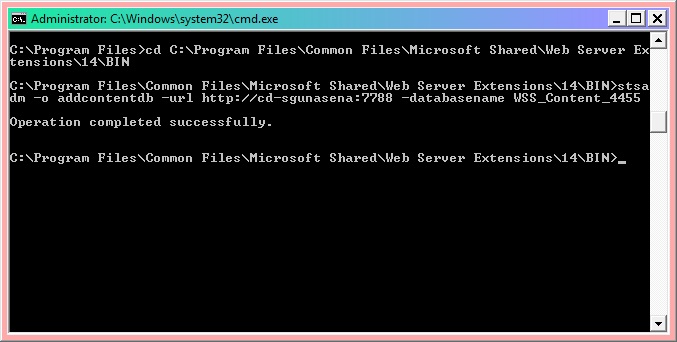
You have to first move into the 14hive in order to perform it using the following command.

C:\Program Files>cd C:\Program Files\Common Files\Microsoft Shared\Web Server Ex
tensions\14\BIN


And then you need to execute the following command in order to get it done the correct way.

C:\Program Files\Common Files\Microsoft Shared\Web Server Extensions\14\BIN>stsa
dm -o addcontentdb -url http://cd-sgunasena:7788 -databasename WSS_Content_4455


Thursday, December 2, 2010

Errors occured while performing Database-Attach Migration

While doing a testing database-attach upgrade from SharePoint 2007 to 2010 I came across some errors.
I was following the steps in Microsoft Technet website and when I was going through database reattaching process I came across several errors and one was like this.


 I found out that I had mixed up the names of the servers I was using. But then there was an error regarding accessing to database.


When I went through some articles in the internet I found out that it was due to the current user not being added to the SPShellAdmin group. This issue can be resolved using this method.

Then again (!) there was another error regarding version incompatibility.


I'm trying get an hotfix for this and rehearse the procedure again.
Today there was a request for a presentation for our head to show to the management, so I had to attend to it with our team :) I will be posting about the updates on these issues!